| cypress | ||
| src | ||
| .eslintrc.js | ||
| .gitignore | ||
| cypress.json | ||
| package-lock.json | ||
| package.json | ||
| README.md | ||
| screenshot.png | ||
| webpack.config.js | ||


MatRepl
- is a Matrix
- and a repl: Read–Eval–Print Loop, where Print is doing operations on vectors and matrices in a graphic environment
- written in vanilla javascript (ES6)
- see live at https://matrepl.net
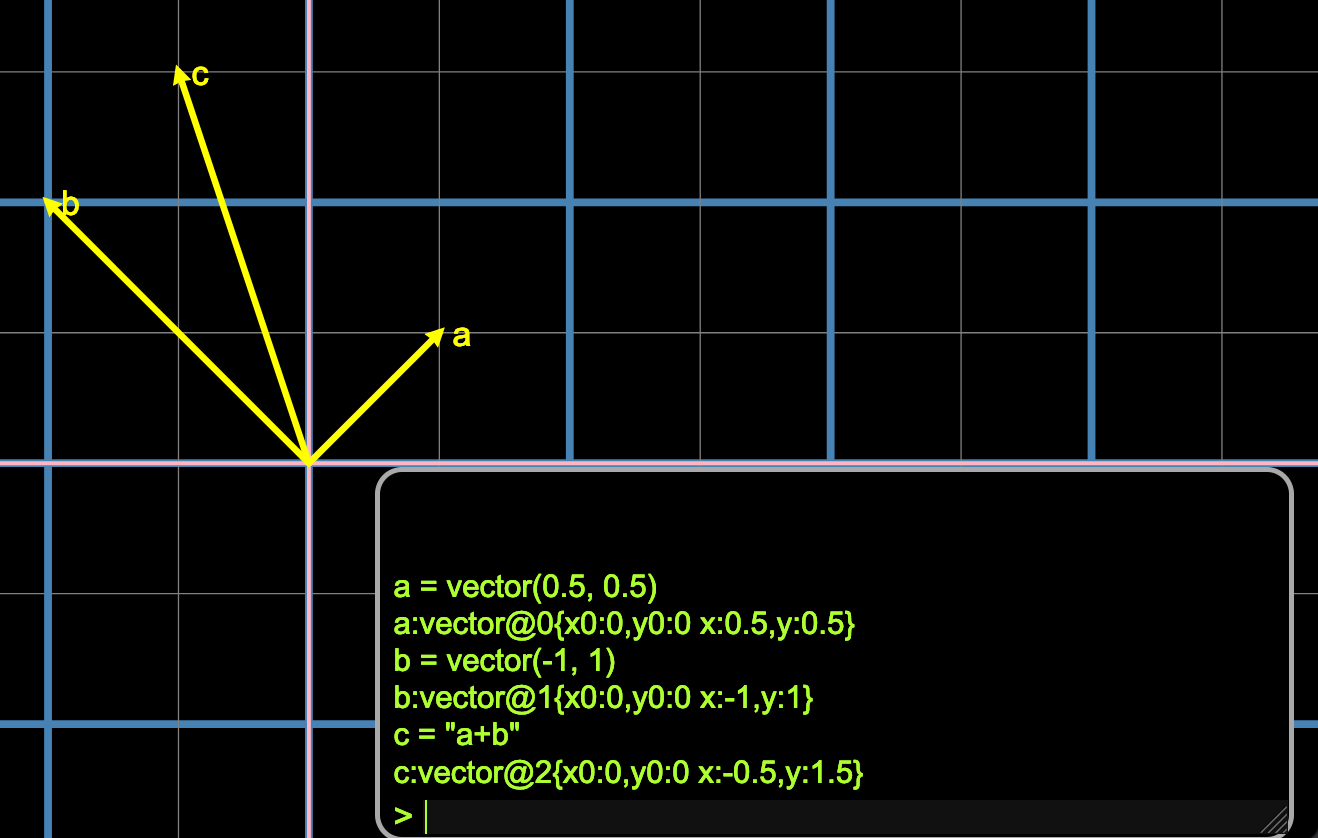
The repl has the following syntax (It's work in progress, new capabilities will be added)
-
arithmetic expressions:
- add(+), subtract(-), divide(/), multiply(*) on scalars, vectors and matrices.
-
variable declaration eg:
a = 1 + 2 -
remove(x)removes bindings (when it's an object (eg vector), removes it from the matrix) -
remove(@n)removes an object using it's assigned index (nis a number)- By the way, values can be bound to a name (assigned to a variable), but you can always also refer to them using their id, using :
@n - so
a = vector(1,1)
> vector@0{x0:0, y0: 1, x:1, y:1}
- and then
@0
> vector@0{x0:0, y0: 1, x:1, y:1}
- By the way, values can be bound to a name (assigned to a variable), but you can always also refer to them using their id, using :
-
method calls:
a = vector(12, 1)works as well. The start is now the origin.> vector@0{x0:0, y0: 2, x:12, y:1}
vector(-1 -1)!=vector(-1-1)and the latter would meanvector(-2)which is not legal. -
arrays: [i0, i1, i2, ... in] creates an array.
- [i0, i1] is special: it is a shorthand for creating a 2-dimensional vector. I'll have to think of another way to create an array of length 2...
-
properties
a = [1,2]a.type
> vector
a.x+1
> 13
-
drag vectors using the mouse pointer. You can change the vector arrows visually
-
lazy evaluation. The difference between
c = a+bandc = "a+b"is that the latter assigns toca parsed expression that can always be evaluated later. When you apply lazy evaluation and later updatea, the value for c will be reevaluated automatically. Combined with vector dragging, this way you can get an intuition for vector addition. Want to do the same for matrix multiplication and basis change. -
Example: enter the following, like in the screenshot:
a = vector(0.5, 0.5) b = vector(-1, 1) c = "a + b" -
and press enter. Then using the mouse pointer move vector
aorb. Or try:a = 2 * aThis updates vectorato twice it's size. And, becausecis defined lazily, it is updated as well!
To run locally
- make sure you have node/npm
- cmdline: npm run start
- and enter
help()